 Client Portal
Key takeaways
- A long password made from a random mix of unrelated words is stronger, and easier to remember, than a short one full of symbols.
- Every account needs its own password, because one leaked password otherwise opens every account that shares it.
- Passwords should never travel by email; share them through a password manager or by phone instead.
- Multi-factor authentication means a stolen password is not enough on its own, as long as you only approve sign-ins you started.
- If a password may have been exposed, change it straight away, starting with email, and tell your IT provider.
Passkeys, fingerprint sign-in and authenticator apps are all gaining ground, and we have written about passkeys separately. But for most small and medium businesses, a password is still what stands between an attacker and the email account, the accounting software and the bank portal.
For a 15-person financial planning practice in Moorabbin, one weak or reused password can be the whole incident. Access to a mailbox is access to client conversations, invoices and the chance to redirect a payment. These five basics are what we ask every team to get right.
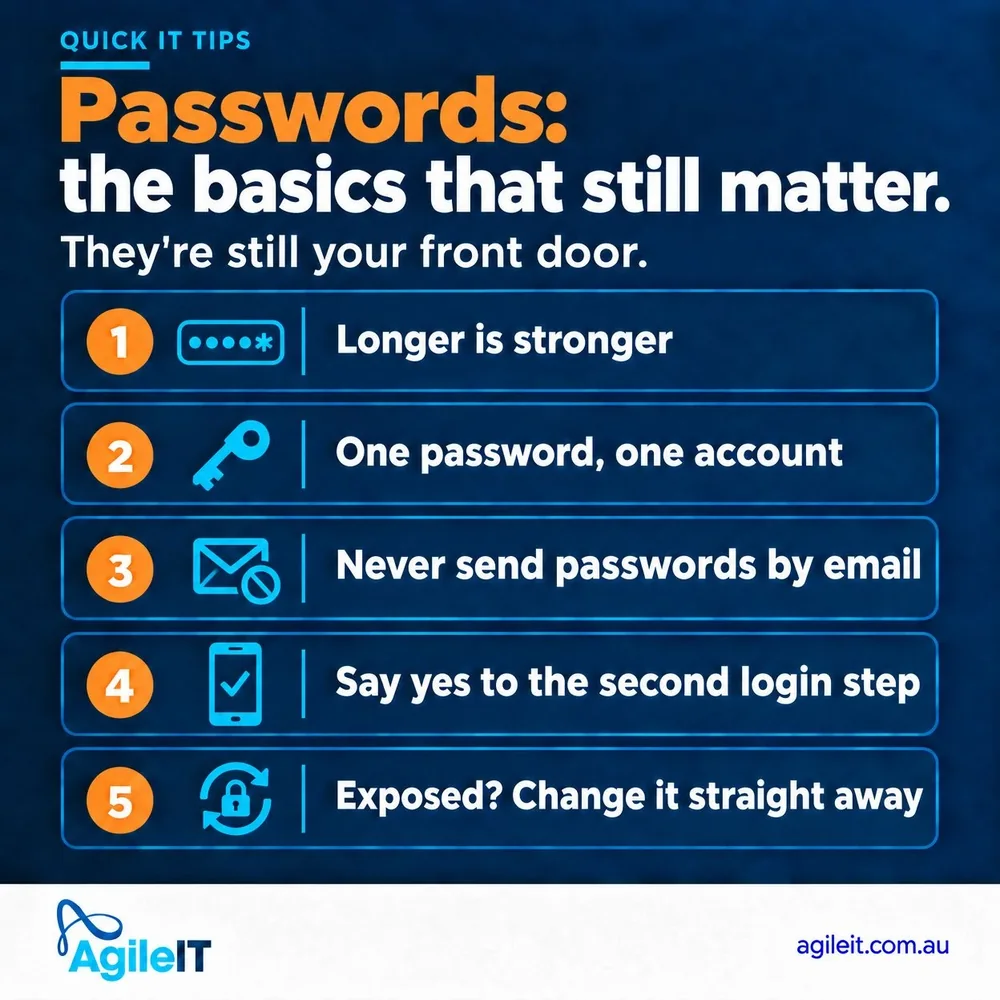
1. Longer is stronger
Length beats complexity. A short password with a capital, a number and a symbol on the end, the classic “Summer2026!”, is one of the first things an attacker’s tools try. The Australian Cyber Security Centre recommends passwords of at least 15 characters, made unpredictable with a random mix of unrelated words (cyber.gov.au).
Something like “harbour violin pepper lantern” is longer, far harder to guess and easier to remember than “Tr0ub!e”. Avoid anything people could find out about you: names, birthdays, your street, the dog, the footy team.
2. One password, one account
Reuse is the real risk. When any website you have ever signed up to is breached, attackers take the email addresses and passwords and try them everywhere else, starting with Microsoft 365 and banking. If your work password is the same as the one you used for a shopping site, their breach becomes your breach.
Nobody can remember fifty different long passwords, and nobody should try. That is what a password manager is for: it creates and stores a unique password for every account, so each person only has to remember one strong one. Keep work and personal accounts separate, too: a work password should never be used on a personal site.
3. Never send passwords by email
An email sits in the sent items, the recipient’s inbox and the backups for years. If either mailbox is ever broken into, one of the first things an attacker searches for is the word “password”. The same goes for chat messages and text messages.
If a password has to be shared, use the sharing feature in a business password manager, or read it out over the phone and have the person change it once they are in. And if anyone asks you to send your password by email, even someone who seems to be from your IT provider, a supplier or the boss, check with them by calling a number you already have before you do anything.
4. Say yes to the second login step
Multi-factor authentication, or MFA, adds a second check after your password, usually an app on your phone. It means a stolen password on its own is not enough to get in. Turn it on for Microsoft 365, banking, your accounting software and anything else that offers it.
One rule makes it work: only approve a sign-in you started. An MFA prompt you were not expecting means someone may already have your password, so deny it and tell your IT provider. MFA is a big step up, but it is not a force field: attackers can still steal a signed-in session, which is why it works best alongside the other four habits (more on that in why MFA alone will not stop a session cookie hijack).
5. Exposed? Change it straight away
The signs are usually one of these: a company tells you your details were caught up in a data breach, you get a sign-in alert you do not recognise, an MFA prompt arrives that you did not start, or you typed your password into a page that turned out to be fake. Organisations covered by the Privacy Act must tell people affected by an eligible data breach, so take those notices seriously.
Change the password straight away, starting with your email, because email is how every other password gets reset. Then change it anywhere else you used it, and tell your IT provider, so they can sign out any other sessions and check the account for changes such as new inbox rules. The ACSC gives the same advice: change your passwords if you think they have been compromised.
Agile IT is based in Mornington and helps businesses across Melbourne and the Peninsula keep their accounts locked down, from MFA and password managers through to AgileSECURE monitoring. If you are not sure how well your team’s accounts are protected, start with a conversation.